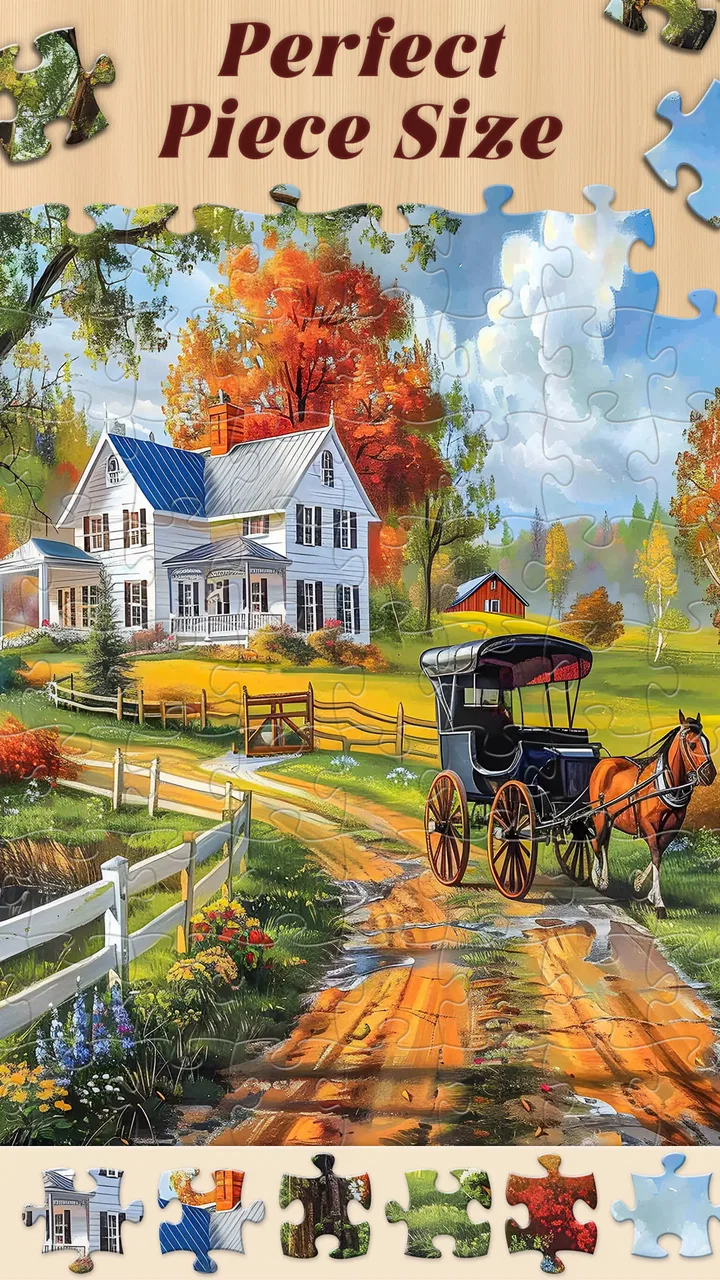
Jigsaw Master - Jigsaw Puzzles
- 4.4
- Rating
- 5.00M
- Installs
- Free
- Price

 Analysis by App-foxy
I spent time with Jigsaw Master as a casual board game, and my first impression was straightforward: it is built for people who enjoy settling into a picture puzzle rather than chasing a complicated game system. The presentation leans heavily on colorful images, while the central activity remains familiar and easy to understand. You choose a picture, work through its pieces, and gradually turn a scattered image into a finished scene.
That simplicity is the main reason the game is approachable. I did not need to learn a long rule set or understand a competitive ranking system before starting. It feels suitable for a quiet break, a short mental reset, or a longer session when I want something repetitive but still mildly engaging. At the same time, the large picture library means the experience is less about discovering one clever puzzle and more about having a continuing supply of visual tasks.
How the puzzle experience works in everyday use
The game comes from Mint Games and belongs to the board-game category, although its actual appeal is closer to a digital jigsaw collection than to a traditional board game. The store summary highlights more than 20,000 pictures and puzzles, which gives the app a very different purpose from a small puzzle title with only a handful of fixed challenges. Here, the attraction is variety and repetition: I can return whenever I want another image without feeling that I have immediately exhausted the basic idea.
You May Also Like

 Blood Strike: 2.5 Anniversary
Blood Strike’s Loadouts Turn Every Drop Into a Tactical Gamble
A close look at Blood Strike’s custom loadouts: how fast access to signature weapons reshapes its battle royale rhythm, rewards preparation, and narrows the gap between fights.

 Pandora - Music & Podcasts
Pandora’s Music Is Easy to Start, but Harder to Recover
Pandora’s strength is its low-effort path from a seed to a station. Its weak spot is how much confidence it asks you to place in connection, setup, and quiet recovery.

 8 Ball Pool
 Is Built on Rivalries, Rematches, and Routine
A close look at the rivalries, rematches, shared routines, and unanswered safety questions that turn a quick pool match into a persistent mobile community.

 Samsung Music
’s Quiet Strength Is Playing What You Already Own
Its reach comes less from spectacle than from dependable access to a personal library. That simplicity is both the app’s strongest retention engine and its ceiling.

 AccuWeather: Weather Radar
AccuWeather Review: A Quick, Clear Forecast for Everyday Decisions
For everyday plans, the best forecast is the one you can understand quickly. AccuWeather makes rain timing, radar, and local conditions easy to act on, with a few trade-offs.

 Hill Climb Racing
Why Hill Climb Racing Still Turns Crashes Into One More Run
A tiny car, a bumpy hill and one more upgrade: Hill Climb Racing keeps resurfacing because its simple chaos makes every near-miss feel personal.
More From Our News Desk



The visual focus matters. A jigsaw is not only about placing pieces correctly; the image itself determines whether the activity feels inviting. Bright scenery, animals, objects, and other attractive subjects can make the same basic interaction feel fresh from one session to the next. I found that this works best when I wanted a low-pressure activity. The picture gives me something to concentrate on, but the game does not demand the kind of constant attention I would give to a strategy game or action title.
A useful way to approach it is to treat each session as a small routine. I might start with a manageable puzzle while waiting for an appointment, then stop after completing a section rather than forcing myself to finish everything. On another day, I can use a more demanding image as a longer focus exercise. That flexibility is more valuable than it may sound because jigsaw games can become tiring when every puzzle is approached as a serious completion task.
The game is free to download, so the initial decision is relatively easy: I can try the core experience without paying an entry fee. That is the clearest value point. However, the app also includes in-app purchases ranging from $6.99 to $69.99 per item. I would therefore separate “free access” from “paid value.” The free version lets me judge whether the picture selection, pacing, and interaction suit me; a purchase only makes sense after I know I will return often enough to justify it.
The age rating is Everyone, which matches the uncomplicated nature of the activity. I would still choose images and session length according to the person using it, especially with younger players, but there is no need to approach it as an adult-only hobby. It can work as a shared activity on a tablet, a quiet solo pastime, or a simple way to give children something visual to focus on without introducing complicated controls.
Why the large library changes the way I use it
A very large collection is useful only if it improves the everyday experience. In this case, the promise of more than 20,000 images means I am less likely to see the app as a one-week novelty. I can browse by mood: calming landscapes when I want something gentle, colorful subjects when I want more visual energy, or familiar-looking scenes when I do not want to spend time deciding what to play.
My practical tip is to avoid choosing solely by the most attractive thumbnail. A beautiful image can become frustrating if its colors are too similar across neighboring areas. When I want a relaxed session, I look for clear contrasts, recognizable objects, or distinct sections in the picture. When I want a stronger concentration challenge, I choose an image with repeated textures or subtle color changes. That turns the library into a way of controlling difficulty, even when I am not looking for a formal difficulty setting.
Another useful habit is to stop before the activity becomes work. Jigsaw games can encourage the “just one more piece” mindset, but visual concentration has a limit. I get more value from a short, satisfying session than from continuing while I am tired and beginning to place pieces randomly. The app suits this approach because its basic format does not require a long uninterrupted commitment.
What it feels like compared with physical puzzles
Compared with a physical jigsaw, the digital format removes several practical problems. I do not need a table that can remain occupied, I cannot accidentally knock pieces onto the floor, and I do not have to store a half-finished image. That makes this version especially convenient for small homes, travel, waiting rooms, or anyone who likes puzzles but does not want the physical setup.
The trade-off is that the screen cannot fully reproduce the tactile satisfaction of handling real pieces. There is no cardboard texture, no sorting tray, and no physical sense of turning a piece around in my hand. If the main pleasure for you is the material experience of a traditional puzzle, this app will feel more like a visual concentration exercise than a replacement.
Digital puzzles do offer a different advantage: they are easier to fit around interruptions. I can put the phone aside when something comes up instead of leaving a physical puzzle spread across a table. That makes Jigsaw Master more practical for fragmented free time. A parent, commuter, or office worker with unpredictable breaks may get more use from it than someone who specifically enjoys a long, uninterrupted evening with a boxed puzzle.
Where the free option offers real value
The free starting point is important because it lets me test the experience before considering any payment. I would use that opportunity carefully rather than assuming that a large content library automatically means good value. The right questions are simple: Do I enjoy the way the pieces are handled? Do I like enough of the available imagery to keep returning? Does the game fit the length of my usual breaks?
If the answer is yes, the free access has already delivered something useful: a repeatable way to relax and focus without an upfront purchase. That is a stronger proposition than a paid puzzle app that asks for commitment before I know whether its style suits me. On the other hand, someone who wants a completely unrestricted experience with no purchase prompts or monetization pressure should examine the app personally before spending money, because the presence of optional items means the free and paid experiences should not be treated as identical.
I would also avoid judging the expensive end of the purchase range in isolation. An item priced at $69.99 can be poor value for an occasional player, while a frequent user may view repeated access to a favorite hobby differently. The important point is that the app is free to begin with, but paid items can become a significant commitment. I would not buy simply because the library is large; I would buy only if the game has become part of my regular routine.
Small decisions that make sessions more enjoyable
One of the less obvious ways to get more from a jigsaw app is to match the puzzle to my attention level. When I am mentally tired, I choose an image with strong shapes and obvious boundaries. This gives me the calming rhythm of sorting and placing without making every move feel like a test. When I am alert, I choose a picture with similar tones or repeating details, because the extra visual search gives the session more substance.
I also prefer using a larger screen when I want to spend more time with a puzzle. A phone is convenient for short breaks, but a tablet-sized display is naturally more comfortable for inspecting details and keeping the overall image visible. This is not a claim about a special device feature; it is simply a practical difference in how much visual space the activity needs. If you mainly play on a small phone, shorter sessions may feel better than attempting a lengthy puzzle in one sitting.
A second tip is to use the image as a memory aid. Instead of examining every loose piece immediately, I first look at the finished picture and divide it mentally into broad zones: sky, ground, faces, buildings, foliage, or other obvious areas. I then work on one zone at a time. This reduces the feeling of searching through everything at once and makes the large library less overwhelming when a new image looks busy.
For families, I would make the activity collaborative rather than competitive. One person can identify likely pieces while another handles placement, or different players can take turns completing sections. Since the game is rated Everyone, it is accessible as a shared visual activity, but the best experience will depend on choosing images that are recognizable and not excessively similar in color. That small choice can make the difference between a calm shared session and a frustrating one.
Limitations I noticed before recommending it
The core idea is intentionally narrow. If you want story progression, character development, tactical decisions, or a strong sense of achievement beyond completing pictures, this is probably not the right board game for you. Its appeal comes from repetition with visual variation. That can be soothing, but it can also feel monotonous if you need every session to introduce a new mechanic.
The huge number of pictures may also create a selection problem. More choice is not always more convenience. When I have too many possibilities, I can spend almost as much time browsing as puzzling. My solution is to choose according to a simple rule, such as picking the first appealing image in a color family or selecting a subject that matches my mood. Without a rule, the library can turn a relaxing break into unnecessary decision-making.
There is also a meaningful difference between a digital jigsaw and a focused puzzle app built around hand-designed challenges. A specialist puzzle game may offer more deliberate progression, clearer difficulty control, or a more distinctive identity. Jigsaw Master is better suited to someone who wants a broad collection and easy repeatability. If you value carefully curated challenge design over quantity, another option may serve you better.
The purchase range is the other point I would keep in mind. Free access makes trying the game low-risk, but the existence of items from $6.99 to $69.99 means I would not describe every possible version of the experience as equally inexpensive. I would begin without paying, decide whether I am a regular player, and set a personal limit before making a purchase. That approach protects the main advantage of the free model while avoiding an impulsive decision based on the size of the library.
Who is most likely to enjoy it
I think the strongest audience is anyone who already likes jigsaw puzzles but wants them available instantly. It is particularly convenient for people who do not have room for a physical puzzle, who dislike losing pieces, or who want to switch images without buying another box. The game also fits casual players who want something more absorbing than scrolling but less demanding than a competitive title.
It can work well for short daily routines. For example, I could use it during a coffee break, complete a small portion, and leave without feeling that I have abandoned a complicated campaign. In the evening, I could return to a different image and spend longer on it. That ability to scale the session around available time is one of the best reasons to keep a digital jigsaw installed.
People who enjoy visual sorting may also find it useful as a gentle focus activity. I would not present it as a medical or educational treatment, but the process does ask me to observe shapes, colors, edges, and relationships. That is enough to make it feel more purposeful than passive entertainment, especially when I choose a puzzle that matches my current concentration level.
I would be more cautious recommending it to players who dislike repetition, want a clear competitive goal, or expect every puzzle to feel dramatically different. The pictures may change, but the fundamental task remains the same. Likewise, if your ideal puzzle experience depends on physical pieces and a shared tabletop, this app is a convenience substitute rather than a full replacement.
Device support and what to expect from the current release
The game supports Android devices running version 7.0 or later, which covers a broad range of phones and tablets. The current version is 1.0.19. For a prospective user, the practical takeaway is to check the operating system before trying to install it, particularly if the device is older or has not been updated in a long time.
Its popularity also suggests that it is not an obscure experiment: the game has passed 5 million installs, with an average rating of 4.5 from around 15,000 ratings and roughly 1,600 written reviews. I treat those figures as useful context rather than a guarantee. A high average can tell me that the general concept works for many people, but it cannot predict whether I will enjoy the visual style, the available free content, or the way purchases fit into my habits.
The release date was December 12, 2023, so I would approach it as a relatively modern entry in the mobile puzzle space rather than an old desktop-style port. Still, the most important test is personal: install it, try several images, and see whether the interaction feels comfortable on your device. A puzzle game can have an appealing concept and still be a poor match if the screen feels cramped or the browsing process does not suit you.
My buy-or-skip verdict
I recommend trying Jigsaw Master if you want a free, visually focused board game with a very large selection of pictures. The entry cost is zero, the age rating is Everyone, and the format is easy to understand almost immediately. For me, its strongest quality is not complexity but convenience: I can open it for a few minutes, choose an image, and get into a steady puzzle rhythm without preparing a table or committing to a long game.
I would skip it if you are looking for a strategic board game, a story-driven experience, or the physical satisfaction of cardboard pieces. I would also avoid paying for optional items until the free experience has proved that you will return regularly. The purchase range, from $6.99 to $69.99 per item, makes that trial-first approach especially sensible.
My final view is positive but specific. This is a good fit for casual puzzlers, visual thinkers, families looking for a simple shared activity, and anyone who wants a portable alternative to a physical jigsaw. It is less convincing for players who need novelty in the mechanics or a carefully structured progression system. The best value comes from treating the free version as a genuine trial, then paying only when the game has earned a regular place in your routine.
FAQs for Jigsaw Master - Jigsaw Puzzles
01What is Jigsaw Master - Jigsaw Puzzles all about?
Jigsaw Master - Jigsaw Puzzles is a digital puzzle app designed for both Android and iOS devices. It offers a wide variety of themes and difficulty levels, allowing users to enjoy a relaxing and engaging puzzle experience. The app also features daily challenges, customizable puzzles, and high-quality images to enhance user enjoyment.
02Are there any in-app purchases in Jigsaw Master - Jigsaw Puzzles?
Yes, Jigsaw Master includes in-app purchases. While the app offers many free puzzles, users can purchase additional puzzle packs, remove ads, or unlock premium features. These purchases enhance the overall experience by providing more content and customization options, ensuring that users can tailor the app to their preferences.
03Can I play Jigsaw Master offline?
Jigsaw Master allows users to play puzzles offline once they have been downloaded. This feature makes it convenient for users who want to enjoy the game without a continuous internet connection. However, certain features like downloading new puzzles or accessing online leaderboards may require an internet connection.
04How does the difficulty level vary in Jigsaw Master?
Jigsaw Master offers a range of difficulty levels to suit all players, from beginners to jigsaw enthusiasts. You can choose the number of pieces for each puzzle, ranging from simple 16-piece puzzles to complex puzzles with over 1000 pieces. This flexibility allows users to challenge themselves progressively as they improve.
05Is there a community or social feature in Jigsaw Master?
Yes, Jigsaw Master includes social features that allow users to connect with others. Players can share their completed puzzles on social media, compete in daily challenges, and even participate in global leaderboards. These features foster a sense of community and encourage friendly competition among players.
Pros
- Variety of puzzle themes available.
- User-friendly interface for easy navigation.
- Offline mode for on-the-go play.
- Regular updates with new puzzles.
- Multiple difficulty levels to challenge.
Cons
- Ads can interrupt gameplay.
- Limited free puzzles available.
- In-app purchases can be pricey.
- No multiplayer or social features.
- Requires significant storage space.

Jigsaw Master - Jigsaw Puzzles
Gallery